Interface CutPlaneManipulatorInterface
addEventListener(pType, pListener, pObject): string;
addEventListener(pType, pListener): string;
areSignalsBlocked(): boolean;
blockSignals(pBlock): void;
dispose(): void;
getCutPlaneHandler(): HTMLElement;
getCutPlaneIds(pCutPlaneIds): boolean;
getInfiniteObjectType(): InfiniteObjectType;
getSelectedCutPlane(): number;
getSnapRotationValue(): number;
hasEventListener(pType, pListener): boolean;
hasEventListenerById(pId): boolean;
isDisposed(): boolean;
isVisible(): boolean;
removeAllEventListeners(): boolean;
removeEventListener(pType, pListener, pObject): boolean;
removeEventListener(pType, pListener): boolean;
removeEventListenerById(pId): boolean;
setCutPlaneId(pCutPlaneId): boolean;
setSnapRotationValue(pSnapValue): boolean;
setVisible(pVisible): boolean;
}
Hierarchy (view full)
- InfiniteObjectDispatcherInterface
- CutPlaneManipulatorInterface
Index
Methods
Methods
add
- add
Event Listener(pType, pListener, pObject): string Adds a listener to an event type.
When an event of the type
pTypefires, the callback pListener will be called. This function returns a unique string id that may be used in removeEventListenerById to allow simple listener removal. It is possible to add an object that will be included in the callback to avoid creating too many closures. Calling twice addEventListener with the same parameters results in the second call to be ignored, only unique pairs callback / object are allowed, in order to avoid calling multiple times the same thing.Parameters
- pType: stringinThe type of the event pListener will be called upon.
- pListener: tListenerCallbackinThe listener function that fires when the given event type occurs.
- pObject: ObjectinThe optional object the callback will be called with when the given event fires.
Returns string
The id of the inserted callback (actually an UUID).
- pType: string
- add
Event Listener(pType, pListener): string Adds a listener to an event type.
When an event of the type
pTypefires, the callback pListener will be called. This function returns a unique string id that may be used in removeEventListenerById to allow simple listener removal.Parameters
- pType: stringinThe type of the event pListener will be called upon.
- pListener: tListenerCallbackinThe listener function that fires when the given event type occurs.
Returns string
The id of the inserted callback (actually an UUID).
- pType: string
are
block
dispose
- dispose(): void
Gets rid of this object.
After this call, this object can no longer be used.
If the object is an InfiniteObjectDispatcherInterface, then the InfiniteObjectDispatcherInterfaceSignal.ObjectDisposed signal is emitted.
Further uses of the object (with the exception of isDisposed, getInfiniteObjectType and application id retrieval) will log a message with LogLevel.LL_UsingDisposedObject.
Returns void
get
get
get
- get
Infinite Object Type(): InfiniteObjectType Tells the type of the given interface.
Returns InfiniteObjectType
The type of the given interface.
get
- get
Selected Cut Plane(): number Gets the current cut plane id that is manipulated or hovered on.
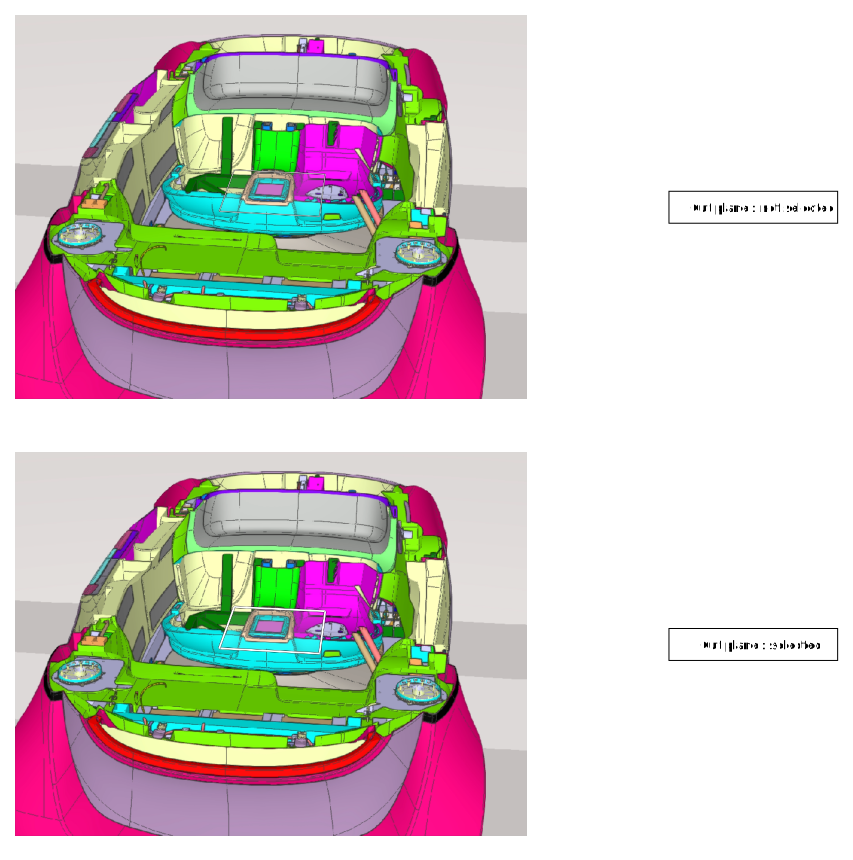
The current selected cut plane is drawn with thicker lines. A cut plane is considered selected if the mouse is over the given plane, or if the given plane is being manipulated.Returns number
0if no cut plane is currently selected, or the selected cut plane id.
get
- get
Snap Rotation Value(): number Gets the CutPlaneManipulatorInterface snapped rotation angle.
This calls returns a number if the rotation is constrained to be a multiple of the given value or
undefinedif no constraint is set.Returns number
The current snapped value in radian if the constraint is set, or undefined if no constraint.
has
- has
Event Listener(pType, pListener): boolean Tells if the EventDispatcher has such a callback registered for the given event type.
Parameters
- pType: stringinThe type of the event to test.
- pListener: tListenerCallbackinThe listener function that gets tested.
Returns boolean
trueif such a listener is installed for the given type of event.- pType: string
has
is
- is
Disposed(): boolean Tells if this object has been gotten rid off.
Returns boolean
trueif dispose has been called on this object.
is
remove
remove
- remove
Event Listener(pType, pListener, pObject): boolean Removes a listener from an event type.
If no such listener is found, then the function returns false and does nothing. You must use the exact parameters that were used in addEventListener to actually remove the listener.
Parameters
- pType: stringinThe type of the listener that gets removed.
- pListener: tListenerCallback
The listener function that gets removed.
- pObject: Object
The listener object that was used when addEventListener was called.
Returns boolean
trueif the callback was removed else false.- pType: string
- remove
Event Listener(pType, pListener): boolean Removes a listener from an event type.
If no such listener is found, then the function returns false and does nothing. You must use the exact parameters that were used in addEventListener to actually remove the listener.
Parameters
- pType: stringinThe type of the listener that gets removed.
- pListener: tListenerCallback
The listener function that gets removed.
Returns boolean
trueif the callback was removed else false.- pType: string
remove
- remove
Event Listener By Id(pId): boolean Removes a listener by its id.
If no such listener is found, then the function returns false and does nothing. You must use the return value of addEventListener to actually remove the listener.
Parameters
- pId: stringinThe id returned by the call to addEventListener that you want to remove.
Returns boolean
trueif the callback was removed else false.- pId: string
set
- set
Cut Plane Id(pCutPlaneId): boolean Sets the cut plane id to manipulate.
Setting the id 0 is valid, it effectively unbinds the cut plane manipulator from a cut plane.
Setting an invalid id to the cut plane manipulator does nothing.
Setting the same id has no effect.
Returns true if the cut plane id exists or if 0 is set.
Parameters
- pCutPlaneId: number | number[]inThe id of the cut plane to manipulate.
Returns boolean
trueif the cut plane corresponding to the id is valid or 0.- pCutPlaneId: number | number[]
set
- set
Snap Rotation Value(pSnapValue): boolean Sets the CutPlaneManipulatorInterface to set a rotation angle to be a multiple of a given value.
Setting a number will set the actual multiple value, setting undefined removes the constraint. Setting a negative or zero value is not allowed.
Returns
trueif the call succeeded.Parameters
- pSnapValue: number
The snap value to set in radian, or undefined if no value should be set.
Returns boolean
trueif the call succeeded.- pSnapValue: number
The CutPlaneManipulatorInterface interface is used to manipulate cut planes.
This is a GUI element that allows an end-user to modify the orientation/position of a cut plane.
The usage is very simple :
Depending on the number of cut planes set by setCutPlaneId, the rendering of the cut plane manipulator may be :
The CutPlaneManipulatorInterface may also be set to snap rotation values to a multiple of a given value (in radian) with setSnapRotationValue.
The user may know when the bound cut plane is modified through the CutPlaneManagerInterfaceSignal from the CutPlaneManagerInterface. She is also notified when a user interaction is started / finished with CutPlaneManipulatorInterfaceSignal signals.
See