Enumeration InfiniteEngineInterfaceSignal
Index
Enumeration Members
Enumeration Members
Data
Signal sent when a data session has finished loading for the given InfiniteEngineInterface.
Depending on the code, this signal may be called just after DataSessionInterfaceSignal.DMULoadingSuccess if the InfiniteEngineInterface is already bound to the data session when the data session has finished loading, or shortly after InfiniteEngineInterface.bindDataSession or DataSessionInterface.bindInfiniteEngine if the data session was already loaded.
No attachment for events of this type.
Display
Called each time the rendering is over (after all is rendered with the callback to window.requestAnimationFrame).
No attachment for events of this type.
Loading
Signal sent by the InfiniteEngineInterface when the loading state of the resource manager has changed.
The event tells the old and new loading state.
The attachment for events of this type is a InfiniteEngineLoadingStateAttachment.
Picked
Signal sent by the InfiniteEngineInterface when a pick request is completed.
A pick request aks to know the content (i.e. geometries, lines, boxes, points) at specific positions in the 3D display. The picking request may concern a specific position (InfiniteEngineInterface.pickAt), a rectangular area (InfiniteEngineInterface.pickRect) or the element that intersects a ray (InfiniteEngineInterface.pickFromRay) inside the 3d view.
The actual picked point follows the following convention :
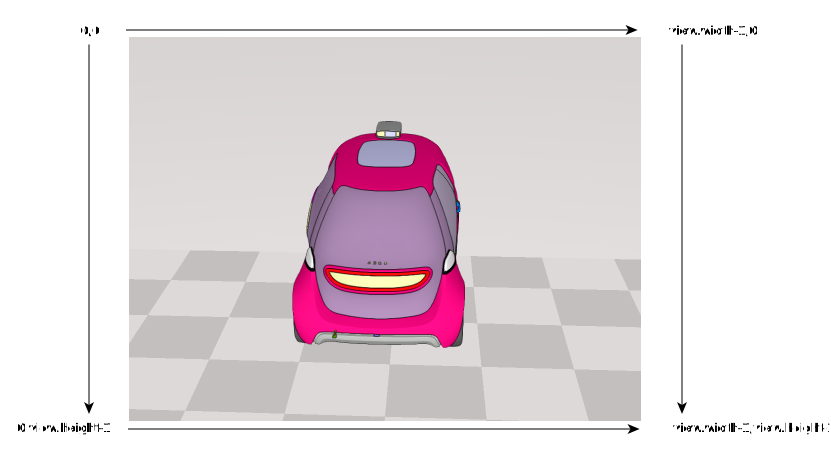
The attachment for events of this type is a PickingAttachment.
Screenshot
Signal sent by the InfiniteEngineInterface when a screenshot request has finished processing.
The attachment for events of this type is an InfiniteImageInterface.
View
Signal sent by the InfiniteEngineInterface when the engine has changed its view, i.e. the bound html element is changed (another element or undefined) with a call to InfiniteEngineInterface.setView.
No attachment for events of this type.
View
Signal sent by the InfiniteEngineInterface when the rendering size of the display has changed.
This may be due to a change in the canvas size or a call to InfiniteEngineInterface.setMaximumEngineResolution with values inferior to the current rendering size.
No attachment for events of this type.
XRSession
(WebXR) Signal sent by the InfiniteEngineInterface when a XR Session is ready to be used.
The attachment for events of this type is an InfiniteXRSession which is a XRSession. XR types are mapped to avoid installing WebXR types.
/**
* Sample to illustrate using a webxr session.
*/
import {
InfiniteEngineInterface, InfiniteEngineInterfaceSignal, InfiniteEvent, InfiniteXRSession,
CameraManagerInterfaceSignal, InfiniteXRReferenceSpace
} from 'generated_files/documentation/appinfiniteapi';
// We try to make a screenshot when all data is loaded
// created previously the 3D engine
let lInfiniteEngine: InfiniteEngineInterface;
// the webXR session
let lCurSession : InfiniteXRSession;
// store the XRSession when ready
lInfiniteEngine.addEventListener(
InfiniteEngineInterfaceSignal.XRSessionReady,
(pEvent: InfiniteEvent) : void =>
{
lCurSession = pEvent.attachments;
}
);
// make some fancy things on camera changes
// we may have used InfiniteEngineInterfaceSignal.DisplayDone
// to be called each frame
lInfiniteEngine.getCameraManager().addEventListener(
CameraManagerInterfaceSignal.CameraLocationChanged,
(_pEvent: InfiniteEvent) : void =>
{
if (!lCurSession)
{
return;
}
const lXRRefSpace : InfiniteXRReferenceSpace | undefined = lInfiniteEngine.getCameraManager().getXRReferenceFrame();
if (!lXRRefSpace)
{
return;
}
// make some computations with XRSession inputs
console.log(lCurSession.inputSources.length);
}
);
// bind the 3D rendering to the div (should have been done earlier :) )
lInfiniteEngine.setView(undefined, { type: 'webxr', options: {} });
The WebXR api should be used with specific hardware.
The InfiniteEngineInterfaceSignal lists all the signals that may be sent by the InfiniteEngineInterface.
These signals are emitted by the InfiniteEngineInterface when the following occurs :
Screenshot sample :
Please refer to InfiniteEngineInterface for more information.
See