Interface InfiniteEngineInterface
addEventListener(pType, pListener, pObject): string;
addEventListener(pType, pListener): string;
addExplodedInstances(pGeometricInstanceIds, pReferencePoint, pScaleMatrix): boolean;
addMatrix(pGeometricInstanceIds, pMatrix): boolean;
arePatchBordersEnabled(): boolean;
areSignalsBlocked(): boolean;
asyncPickAt(pX, pY, pPickOnlyClosest): Promise<AsyncPickingResult>;
asyncPickFromRay(pOrigin, pDirection, pPickOnlyClosest): Promise<AsyncPickingResult>;
asyncPickRect(pRectangle, pPickOnlyClosest): Promise<AsyncPickingResult>;
asyncScreenshot(pScreenshotType, pInBase64, pFormat?, pQuality?): Promise<AsyncScreenshotResult>;
asyncWaitForDataLoaded(pTimeoutInMilliseconds?): Promise<AsyncDataLoadedResult>;
asyncWaitForDataSessionLoaded(pDataSession?): Promise<AsyncResultReason>;
bindDataSession(pDataSession): boolean;
blockSignals(pBlock): void;
computePickRay(pX, pY, pPickRayOut, pOrigin): boolean;
dispose(): void;
enableAntiAliasing(pEnable): boolean;
enableCopyrightedWatermark(pEnabled): boolean;
enableEdgeDetect(pEnable): boolean;
enablePatchBorders(pEnable): boolean;
fromJSON(pEngineData): boolean;
getAnnotationRenderer(): AnnotationRendererInterface;
getBackground(pBackgroundColor): boolean;
getBindSessionProgress(): number;
getBoundDataSession(): DataSessionInterface;
getCameraManager(): CameraManagerInterface;
getCurrentGeometricAABB(pGeometricInstanceId, pAABBOut): boolean;
getCurrentGeometricMatrix(pGeometricInstanceId, pMatrixOut): boolean;
getCurrentUnitedAABB(pGeometricInstanceIds, pAABBOut): boolean;
getCutPlaneManager(): CutPlaneManagerInterface;
getDefaultHardwareInstancingUsage(): boolean;
getDefaultVertexArrayObjectsUsage(): boolean;
getFeatureManager(): FeatureManagerInterface;
getFixedResolution(pResolution): boolean;
getGeometricState(pGeometricId): number;
getInfiniteObjectType(): InfiniteObjectType;
getLastPickingRequestId(): string;
getMaterialManager(): MaterialManagerInterface;
getPerformance(): InfiniteEnginePerformanceInterface;
getPrimitiveManager(): PrimitiveManagerInterface;
getRenderingMode(): RenderingMode;
getResourceLoadingProgress(): number;
getResourceLoadingState(): LoadingStates;
getTransformedInstances(pInstances): boolean;
getView(): HTMLElement;
getVisualAABB(pBitMask, pBitValue, pAABB): boolean;
getWebGLRenderingContext(): WebGLRenderingContext;
getXRFrame(): any;
getXRSession(): any;
hasEventListener(pType, pListener): boolean;
hasEventListenerById(pId): boolean;
isAntiAliasingEnabled(): boolean;
isCopyrightedWatermarkEnabled(): boolean;
isDisposed(): boolean;
isEdgeDetectEnabled(): boolean;
isLoaded(): boolean;
isRendererIdle(): boolean;
isUsingHardwareInstancing(): boolean;
isUsingVertexArrayObjects(): boolean;
pickAt(pX, pY, pPickOnlyClosest): boolean;
pickFromRay(pOrigin, pDirection, pPickOnlyClosest): boolean;
pickRect(pRectangle, pPickOnlyClosest): boolean;
projectToScreen(pPoint, pScreenCoordinatesOut): boolean;
removeAllEventListeners(): boolean;
removeEventListener(pType, pListener, pObject): boolean;
removeEventListener(pType, pListener): boolean;
removeEventListenerById(pId): boolean;
restoreAllOriginalMatrices(): void;
restoreOriginalMatrix(pGeometricInstanceIds): boolean;
screenshot(pScreenshotType, pInBase64, pFormat?, pQuality?): string;
setAntiAliasingEnabled(pEnable): boolean;
setBackground(pUseBackgroundColor, pBackgroundColor?): boolean;
setCopyrightedWatermarkEnabled(pEnabled): boolean;
setDefaultHardwareInstancingUsage(pEnable): void;
setDefaultVertexArrayObjectsUsage(pEnable): void;
setEdgeDetectEnabled(pEnable): boolean;
setFixedResolution(pWidth, pHeight, pWindowRatio): boolean;
setMatrix(pGeometricInstanceIds, pMatrix): boolean;
setMaximumEngineResolution(pWidth, pHeight): boolean;
setPatchBordersEnabled(pEnable): boolean;
setRenderingMode(pRenderingMode): boolean;
setView(pView, pForceEngineType?): boolean;
toJSON(pKey?): Object;
unsetFixedResolution(): void;
updateGeometricState(pGeometricIds, pBitMask, pBitValue): boolean;
updateGeometricStateForAll(pBitMask, pBitValue): boolean;
}
Hierarchy (view full)
- InfiniteObjectDispatcherInterface
- InfiniteEngineInterface
Index
Methods
Methods
add
- add
Event Listener(pType, pListener, pObject): string Adds a listener to an event type.
When an event of the type
pTypefires, the callback pListener will be called. This function returns a unique string id that may be used in removeEventListenerById to allow simple listener removal. It is possible to add an object that will be included in the callback to avoid creating too many closures. Calling twice addEventListener with the same parameters results in the second call to be ignored, only unique pairs callback / object are allowed, in order to avoid calling multiple times the same thing.Parameters
- pType: stringinThe type of the event pListener will be called upon.
- pListener: tListenerCallbackinThe listener function that fires when the given event type occurs.
- pObject: ObjectinThe optional object the callback will be called with when the given event fires.
Returns string
The id of the inserted callback (actually an UUID).
- pType: string
- add
Event Listener(pType, pListener): string Adds a listener to an event type.
When an event of the type
pTypefires, the callback pListener will be called. This function returns a unique string id that may be used in removeEventListenerById to allow simple listener removal.Parameters
- pType: stringinThe type of the event pListener will be called upon.
- pListener: tListenerCallbackinThe listener function that fires when the given event type occurs.
Returns string
The id of the inserted callback (actually an UUID).
- pType: string
add
- add
Exploded Instances(pGeometricInstanceIds, pReferencePoint, pScaleMatrix): boolean 'Explodes' the given
geometric instanceswith the given scale.The transform will be applied to the current position of the given
geometric instances.The explosion algorithm is simple, the center of each
geometric instanceis translated by an amount depending on the current distance between the center and a given point (center of the 'explosion').Returns
trueif at least onegeometric instance idinsidepGeometricInstanceIdsis valid and thus modified. Returnsfalseif pScaleMatrix is identity. Floating point numbers are considered invalid, and numbers outside the range of valid geometric instance ids are silently discarded (such numbers are not considered invalid, they are just discarded). Invalid geometric instance ids are also values that are not numbers. Invalid geometric instance ids are discarded, and if all values are discarded, the function returnsfalse.You may want to :
- Compute the explosion of the x axis : pScaleMatrix.set(scale, 0, 0, 0, 0, 1, 0, 0, 0, 0, 1, 0, 0, 0, 0, 1);
- Compute the explosion of the y axis : pScaleMatrix.set(1, 0, 0, 0, 0, scale, 0, 0, 0, 0, 0, 1, 0, 0, 0, 1);
- Compute the explosion on a specific frame : R1, R2, R3 (R1 and R2 orthogonal, R2 and R3 orthogonal), on axis R1:
- pRotationMatrix.set(R1.x, R1.y, R1.z, 0, R2.x, R2.y, R2.z, 0, R3.x, R3.y, R3.z, 0, 0, 0, 0, 1).
- pInverseRotationMatrix.set(R1.x, R2.x, R3.x, 0, R1.y, R2.y, R3.y, R1.z, R2.z, 0, R3.z, 0, 0, 0, 0, 1).
- pUnitScaleMatrix.set(scale, 0, 0, 0, 0, 1, 0, 0, 0, 0, 1, 0, 0, 0, 0, 1).
- pRotationMatrix.multiplyMatrixRight(pUnitScaleMatrix, pScaleMatrix).
- pScaleMatrix.multiplyMatrixRight(pInverseRotationMatrix)
- pScaleMatrix now holds the explosion in the given specific direction.
- pRotationMatrix.set(R1.x, R1.y, R1.z, 0, R2.x, R2.y, R2.z, 0, R3.x, R3.y, R3.z, 0, 0, 0, 0, 1).
Parameters
Returns boolean
trueif at least onegeometric instance idinsidepGeometricInstanceIdsis modified and ifpMatrixis not identity.
add
- add
Matrix(pGeometricInstanceIds, pMatrix): boolean Transforms the given
geometric instancesby the given matrix.The transform will be applied to the current position of the given
geometric instances.Returns
trueif at least onegeometric instance idinsidepGeometricInstanceIdsis valid and thus modified. Returnsfalseif pMatrix is identity. Floating point numbers are considered invalid, and numbers outside the range of valid geometric instance ids are silently discarded (such numbers are not considered invalid, they are just discarded). Invalid geometric instance ids are also values that are not numbers. Invalid geometric instance ids are discarded, and if all values are discarded, the function returnsfalse.Parameters
- pGeometricInstanceIds: number | number[] | Uint32Arrayinthe list of
geometric instance idsto query. - pMatrix: Matrix4inthe transformation to add to the current geometry position.
Returns boolean
trueif at least onegeometric instance idinsidepGeometricInstanceIdsis modified and ifpMatrixis not identity.- pGeometricInstanceIds: number | number[] | Uint32Array
are
are
async
- async
Pick At(pX, pY, pPickOnlyClosest): Promise<AsyncPickingResult> Requests an asynchronous pick in the 3D at coordinates [pX,pY] (
(0,0)is on the upper left of screen).The result is an AsyncPickingResult.
If
pPickOnlyClosestistrue, then only the closest item under the picked point will be included, discarding other types of data if relevant.Parameters
- pX: numberinNumber between 0 and view3d.width-1, origin is the left side of the view (as retrieved from the MouseEvent).
- pY: numberinNumber between 0 and view3d.height-1, origin is the upper side of the view (as retrieved from the MouseEvent).
- pPickOnlyClosest: booleaninIf set, only closest items will be retrieved.
Returns Promise<AsyncPickingResult>
A promise. The promise is resolved with the reason (success, cancelled, disposed, bad input). In case of success, the promise is resolved with the picking attachment.
- pX: number
async
- async
Pick From Ray(pOrigin, pDirection, pPickOnlyClosest): Promise<AsyncPickingResult> Requests an asynchronous pick in the 3D from a 3D ray.
The 3D is not required to come from the position of the camera, but the ray must be oriented toward the direction of the camera (the dot vector between the direction of the camera and the direction of the ray must be positive). The ray is a half line that comes from the origin and follows the direction to the infinity.
Fires the event InfiniteEngineInterfaceSignal.Picked when the result is ready. Attachment is a PickingAttachment. Please use getLastPickingRequestId to know the pick request id in case of multiple pick requests.
If
pPickOnlyClosestistrue, then only the closest item under the picked ray will be included, discarding other types of data if relevant./**
* Sample to illustrate the handling of an asynchronous ray pick in an InfiniteEngineInterface.
*/
import {
InfiniteEngineInterface, InfiniteFactory, PickingAttachment, PickingAttachmentItem, Vector3, VisualStates, AsyncPickingResult,
AsyncResultReason,
} from 'generated_files/documentation/appinfiniteapi';
// the div to render to
let lView3D: HTMLElement;
// create an 3D engine
const lInfiniteEngine: InfiniteEngineInterface = InfiniteFactory.CreateInfiniteEngine();
// We pick a rectangle if big enough, else only a point
let pickAtImpl : () => Promise<void> = undefined;
// created previously : the origin of the 3D ray to pick from
let lPickRayOrigin : Vector3;
// created previously : the direction of the 3D ray to pick from
let lPickRayDirection : Vector3;
// bind the 3D rendering to the div
lInfiniteEngine.setView(lView3D);
// ####################################################################################################################################
// ############################################ PICKING ###############################################################################
// ####################################################################################################################################
// What to do on pick ?
const onPicking = (pAttachment: PickingAttachment) : void =>
{
// care only about 3d geometries (no line, point, box)
const l3dAttachment: PickingAttachmentItem[] | undefined = pAttachment.geometric;
let lFirstGeometricId: number = 0;
let l3dPosition: Vector3 | undefined = undefined;
if (l3dAttachment !== undefined && l3dAttachment.length > 0)
{
lFirstGeometricId = l3dAttachment[0].instanceId;
l3dPosition = l3dAttachment[0].position;
}
// clear selected state on pick
let lWasSelected: boolean = false;
if (lFirstGeometricId !== 0)
{
const lGeomState = lInfiniteEngine.getGeometricState(lFirstGeometricId);
lWasSelected = ((lGeomState & VisualStates.S_Selected) !== 0);
}
// if multiple selections => do not change the selected state of a single geometry
// but select all the relevant 3D data instead
if (l3dAttachment && l3dAttachment.length > 1)
{
lWasSelected = false;
}
// unselect everyone
lInfiniteEngine.updateGeometricStateForAll(VisualStates.S_Selected, ~VisualStates.S_Selected);
// and begin
if (lFirstGeometricId !== 0 && !lWasSelected && l3dAttachment)
{
// update visual state of selected items
const lIds = new Uint32Array(l3dAttachment.length);
for (let i = 0; i < l3dAttachment.length; i += 1) {
lIds[i] = l3dAttachment[i].instanceId;
}
lInfiniteEngine.updateGeometricState(lIds, VisualStates.S_Selected, VisualStates.S_Selected);
}
};
// We pick a rectangle if big enough, else only a point
pickAtImpl = async () : Promise<void> =>
{
const lPickingResult : AsyncPickingResult = await lInfiniteEngine.asyncPickFromRay(lPickRayOrigin, lPickRayDirection, false);
if (lPickingResult.reason !== AsyncResultReason.ARR_Success || lPickingResult.value === undefined)
{
return;
}
onPicking(lPickingResult.value);
};
pickAtImpl();
There are some limitations to the 3D ray pick : * Only 3D elements actually rendered may be picked (no ray pick outside the frustum). * The pick ray algorithm rely on the projection of the surfaces to the near plane, objects that are less than 2 pixels wide and 2 pixels high cannot be picked.Parameters
Returns Promise<AsyncPickingResult>
A promise. The promise is resolved with the reason (success, cancelled, disposed, bad input). In case of success, the promise is resolved with the picking attachment.
async
- async
Pick Rect(pRectangle, pPickOnlyClosest): Promise<AsyncPickingResult> Requests an asynchronous pick in the 3D from a screen space rectangle.
(0,0) is on the upper left of screen. The result is an AsyncPickingResult.
If
pPickOnlyClosestistrue, then only the closest items under the picked rectangle will be included, discarding other types of data if relevant.Parameters
- pRectangle: RectangleinThe screen space rectangle to pick from. Origin of the screen is the top-left of the view (as retrieved from the MouseEvent).
- pPickOnlyClosest: booleaninIf set, only closest items will be retrieved.
Returns Promise<AsyncPickingResult>
A promise. The promise is resolved with the reason (success, cancelled, disposed, bad input). In case of success, the promise is resolved with the picking attachment.
- pRectangle: Rectangle
async
- async
Screenshot(pScreenshotType, pInBase64, pFormat?, pQuality?): Promise<AsyncScreenshotResult> Requests an asynchronous screenshot.
The current image of the display is grabbed (without the navigation cube and manipulators such as cut plane manipulators), or the geometric instance ids, depending on the screenshot request type, and a screenshot promise is returned.
The resulting screenshot data will be base64 encoded if pInBase64 is set to true (InfiniteImageInterface.data will be a string, else a UInt8Array).
When using ScreenshotType.ST_Color,
pFormattells the resulting format of the data, 'image/png' is by default. Available formats are the same as theHTMLCanvasElement.toDataURL()orHTMLCanvasElement.toBlob()calls. The API adds the 'image/raw' format to deal with individual pixels if requested (without image encoding).pQualityis a number in the [0,1] range, telling the expected quality if the requested format is a lossy compression scheme, such as 'image/jpeg'. If the requested format is not handled by the browser, 'image/png' type will be used.When using other formats,
pFormatandpQualityare ignored.If pInBase64 is true, you may create a data url with the following code :
/**
* Sample to illustrate the asynchronous screenshot procedure of the InfiniteEngineInterface.
*/
import {
InfiniteEngineInterface, LoadingStates, Vector3,
InfiniteImageInterface, ScreenshotType, AsyncDataLoadedResult, AsyncResultReason, AsyncScreenshotResult
} from 'generated_files/documentation/appinfiniteapi';
// We try to make a screenshot when all data is loaded
// the div to render the 3D display
let lView3D: HTMLElement;
// created previously, should receive the image data to be displayed to the user (or ask for a download maybe ?)
let lImageData : HTMLImageElement;
// created previously the position of the camera for the screenshot
let lCameraLocation : Vector3;
// created previously the camera center of interest
let lCenterOfInterest : Vector3;
// created previously the 3D engine
let lInfiniteEngine: InfiniteEngineInterface;
const takeScreenshot = async () : Promise<void> =>
{
// bind the 3D rendering to the div (should have been done earlier :) )
lInfiniteEngine.setView(lView3D);
// we will make screenshot of 1024x1024
lInfiniteEngine.setFixedResolution(1024, 1024, 1);
// go to the expected position / location
lInfiniteEngine.getCameraManager().setCameraLocation(lCameraLocation);
lInfiniteEngine.getCameraManager().lookAt(lCenterOfInterest, 0);
// What to do when all data is loaded ?
const lDataLoaded : AsyncDataLoadedResult = await lInfiniteEngine.asyncWaitForDataLoaded();
if (lDataLoaded.reason !== AsyncResultReason.ARR_Success || lDataLoaded.value === undefined)
{
// this is an error that should not happen (perhaps the engine interface has been destroyed ?)
console.log('screenshot procedure failed for some reason');
return;
}
const lDataLoadedState : LoadingStates = lDataLoaded.value.newLoadingState;
switch (lDataLoadedState)
{
case LoadingStates.S_Loading:
// this is an unexpected error
console.log('unexpected error');
return;
case LoadingStates.S_OutOfBudget:
// some fancy message
console.log('Taking a screenshot without everything loaded');
// but we still make a screenshot :)
break;
default:
break;
}
const lScreenshot : AsyncScreenshotResult = await lInfiniteEngine.asyncScreenshot(ScreenshotType.ST_Color, true, 'image/jpeg', 0.95);
if (lScreenshot.reason !== AsyncResultReason.ARR_Success || lScreenshot.value === undefined)
{
// this is an error that may happen (perhaps the engine interface has been destroyed ?, or bad inputs ?)
console.log('screenshot procedure failed for some reason');
return;
}
// What to do when screenshot is ready ?
// the image result
const lInfiniteImage : InfiniteImageInterface = lScreenshot.value;
// is the image valid ? and base64 encoded ?
if ((lInfiniteImage.width === 0) || (!lInfiniteImage.data) || (!lInfiniteImage.base64))
{
console.log('Unexpected screenshot error, aborting');
return;
}
// create the data url in base64
// even if we did not get the expected format, we still get the result
const lDataUrl : string = 'data:' + lInfiniteImage.format + ';base64,' + lInfiniteImage.data;
// resize the image markup
lImageData.width = lInfiniteImage.width;
lImageData.height = lInfiniteImage.height;
// and set data
lImageData.src = lDataUrl;
// we get back to the size of the 3d view but this is up to the application needs
lInfiniteEngine.unsetFixedResolution();
};
takeScreenshot();
The result is an AsyncScreenshotResult.Parameters
- pScreenshotType: ScreenshotTypeinThe request screenshot type (image, geometric instance ids, etc).
- pInBase64: booleaninIf set to true, InfiniteImageInterface.data will be a base64 string.
OptionalpFormat: stringinThe expected format of the resulting screenshot data ('image/png' by default).OptionalpQuality: numberinThe expected quality of the resulting screenshot data, in the [0,1] range in case of lossy compression formats.
Returns Promise<AsyncScreenshotResult>
A promise. The promise is resolved with the reason (success, cancelled, disposed, bad input). In case of success, the promise is resolved with the screenshot content.
- pScreenshotType: ScreenshotType
async
- async
Wait For Data Loaded(pTimeoutInMilliseconds?): Promise<AsyncDataLoadedResult> Requests an asynchronous wait for data loaded.
The promise is signaled when the data loading process is over, i.e. when getResourceLoadingState returns LoadingStates.S_AllLoaded or LoadingStates.S_OutOfBudget.
An example with a screenshot procedure :
/**
* Sample to illustrate the asynchronous screenshot procedure of the InfiniteEngineInterface.
*/
import {
InfiniteEngineInterface, LoadingStates, Vector3,
InfiniteImageInterface, ScreenshotType, AsyncDataLoadedResult, AsyncResultReason, AsyncScreenshotResult
} from 'generated_files/documentation/appinfiniteapi';
// We try to make a screenshot when all data is loaded
// the div to render the 3D display
let lView3D: HTMLElement;
// created previously, should receive the image data to be displayed to the user (or ask for a download maybe ?)
let lImageData : HTMLImageElement;
// created previously the position of the camera for the screenshot
let lCameraLocation : Vector3;
// created previously the camera center of interest
let lCenterOfInterest : Vector3;
// created previously the 3D engine
let lInfiniteEngine: InfiniteEngineInterface;
const takeScreenshot = async () : Promise<void> =>
{
// bind the 3D rendering to the div (should have been done earlier :) )
lInfiniteEngine.setView(lView3D);
// we will make screenshot of 1024x1024
lInfiniteEngine.setFixedResolution(1024, 1024, 1);
// go to the expected position / location
lInfiniteEngine.getCameraManager().setCameraLocation(lCameraLocation);
lInfiniteEngine.getCameraManager().lookAt(lCenterOfInterest, 0);
// What to do when all data is loaded ?
const lDataLoaded : AsyncDataLoadedResult = await lInfiniteEngine.asyncWaitForDataLoaded();
if (lDataLoaded.reason !== AsyncResultReason.ARR_Success || lDataLoaded.value === undefined)
{
// this is an error that should not happen (perhaps the engine interface has been destroyed ?)
console.log('screenshot procedure failed for some reason');
return;
}
const lDataLoadedState : LoadingStates = lDataLoaded.value.newLoadingState;
switch (lDataLoadedState)
{
case LoadingStates.S_Loading:
// this is an unexpected error
console.log('unexpected error');
return;
case LoadingStates.S_OutOfBudget:
// some fancy message
console.log('Taking a screenshot without everything loaded');
// but we still make a screenshot :)
break;
default:
break;
}
const lScreenshot : AsyncScreenshotResult = await lInfiniteEngine.asyncScreenshot(ScreenshotType.ST_Color, true, 'image/jpeg', 0.95);
if (lScreenshot.reason !== AsyncResultReason.ARR_Success || lScreenshot.value === undefined)
{
// this is an error that may happen (perhaps the engine interface has been destroyed ?, or bad inputs ?)
console.log('screenshot procedure failed for some reason');
return;
}
// What to do when screenshot is ready ?
// the image result
const lInfiniteImage : InfiniteImageInterface = lScreenshot.value;
// is the image valid ? and base64 encoded ?
if ((lInfiniteImage.width === 0) || (!lInfiniteImage.data) || (!lInfiniteImage.base64))
{
console.log('Unexpected screenshot error, aborting');
return;
}
// create the data url in base64
// even if we did not get the expected format, we still get the result
const lDataUrl : string = 'data:' + lInfiniteImage.format + ';base64,' + lInfiniteImage.data;
// resize the image markup
lImageData.width = lInfiniteImage.width;
lImageData.height = lInfiniteImage.height;
// and set data
lImageData.src = lDataUrl;
// we get back to the size of the 3d view but this is up to the application needs
lInfiniteEngine.unsetFixedResolution();
};
takeScreenshot();
Please make sure the destination browser supports promises before using async calls.Parameters
OptionalpTimeoutInMilliseconds: numberinIf strictly positive, the wait will not be more than pTimeoutInMilliseconds milliseconds.
Returns Promise<AsyncDataLoadedResult>
A promise. The promise is resolved with the reason (success, cancelled, disposed, bad input). In case of success, the promise is resolved with the resource loading state.
async
- async
Wait For Data Session Loaded(pDataSession?): Promise<AsyncResultReason> Requests an asynchronous wait for the bound data session (DataSessionInterface) to be loaded.
If
pDataSessionis undefined, then the call waits for the currently bound DataSessionInterface to be loaded. IfpDataSessionis set, this call sets the given DataSessionInterface with bindDataSession and waits for it to be loaded in this InfiniteEngineInterface.The promise is signaled when the InfiniteEngineInterface has finished loading data from the currently bound DataSessionInterface.
If the InfiniteEngineInterface is bound to another DataSessionInterface during the call or if the InfiniteEngineInterface is disposed, then the Promise is signalled with an error. If the InfiniteEngineInterface is already loaded, the promise is signalled right away.
Returns a Promise telling if the InfiniteEngineInterface has finished loading resources from the DataSessionInterface.
Parameters
OptionalpDataSession: DataSessionInterfaceinIf set and different from the currently bound DataSessionInterface then the given DataSessionInterface is bound.
Returns Promise<AsyncResultReason>
A promise. The promise is resolved with the reason (success, cancelled, disposed, bad input).
bind
- bind
Data Session(pDataSession): boolean Binds/Unbinds the given DataSessionInterface to this engine.
If undefined, this call unbinds the InfiniteEngineInterface from the previously bound DataSessionInterface. If
pDataSessionis the same as the previously bound DataSessionInterface, this call does nothing.This call is the same as DataSessionInterface.bindInfiniteEngine / DataSessionInterface.unbindInfiniteEngine).
There may be a delay between the call to bindDataSession and the data being displayed on the InfiniteEngineInterface. Please test using isLoaded, and if data is not loaded, wait for InfiniteEngineInterfaceSignal.DataSessionLoaded.
Parameters
- pDataSession: DataSessionInterfaceinThe DataSessionInterface to bind to.
Returns boolean
trueif the call succeeded.- pDataSession: DataSessionInterface
block
compute
- compute
Pick Ray(pX, pY, pPickRayOut, pOrigin): boolean Gets the 3D representation of a ray from the camera to the normalized screen ray position.
(0,0) is the upper left of screen. (1,1) is the bottom right of screen. The 3D representation is expressed as a position (the camera position) and a direction. Making a computePickRay(0,0,lDir0,lCamPos), computePickRay(0,1,lDir1,lCamPos), computePickRay(1,0,lDir2,lCamPos), computePickRay(1,0,lDir3,lCamPos) effectively stores the limiting rays of the view frustum.
Parameters
Returns boolean
trueif [pX pY] was inside[0:1].
dispose
- dispose(): void
Gets rid of this object.
After this call, this object can no longer be used.
If the object is an InfiniteObjectDispatcherInterface, then the InfiniteObjectDispatcherInterfaceSignal.ObjectDisposed signal is emitted.
Further uses of the object (with the exception of isDisposed, getInfiniteObjectType and application id retrieval) will log a message with LogLevel.LL_UsingDisposedObject.
Returns void
enable
- enable
Anti Aliasing(pEnable): boolean Enables / disables anti aliasing.
Anti aliasing is disabled by default.
This is the same call as setAntiAliasingEnabled.
Parameters
- pEnable: booleaninIf set, enables the anti aliasing.
Returns boolean
trueis the call succeeded.- pEnable: boolean
enable
- enable
Copyrighted Watermark(pEnabled): boolean Enables / disables the copyrighted watermark.
The copyrighted watermark is the information provided on the bottom right of the rendering that tells about the authors of the javascript API :) .
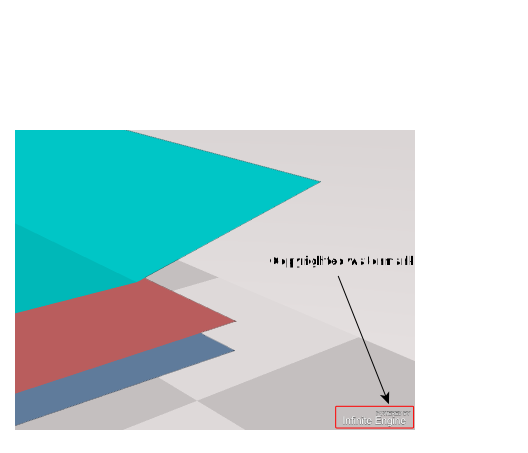
The copyrighted watermark is enabled by default.This is the same call as setCopyrightedWatermarkEnabled.
Parameters
- pEnabled: booleaninIf set, enables the copyrighted watermark on the rendering.
Returns boolean
trueif the call succeeded.- pEnabled: boolean
enable
- enable
Edge Detect(pEnable): boolean Enables / disables edge detection mechanism.
Edge detection is disabled by default.
This is the same call as setEdgeDetectEnabled.
Parameters
- pEnable: booleaninIf set, enables the edge detection mechanism.
Returns boolean
trueif the call succeeded.- pEnable: boolean
enable
- enable
Patch Borders(pEnable): boolean Enables / disables patch borders mechanism.
Patch borders are disabled by default.
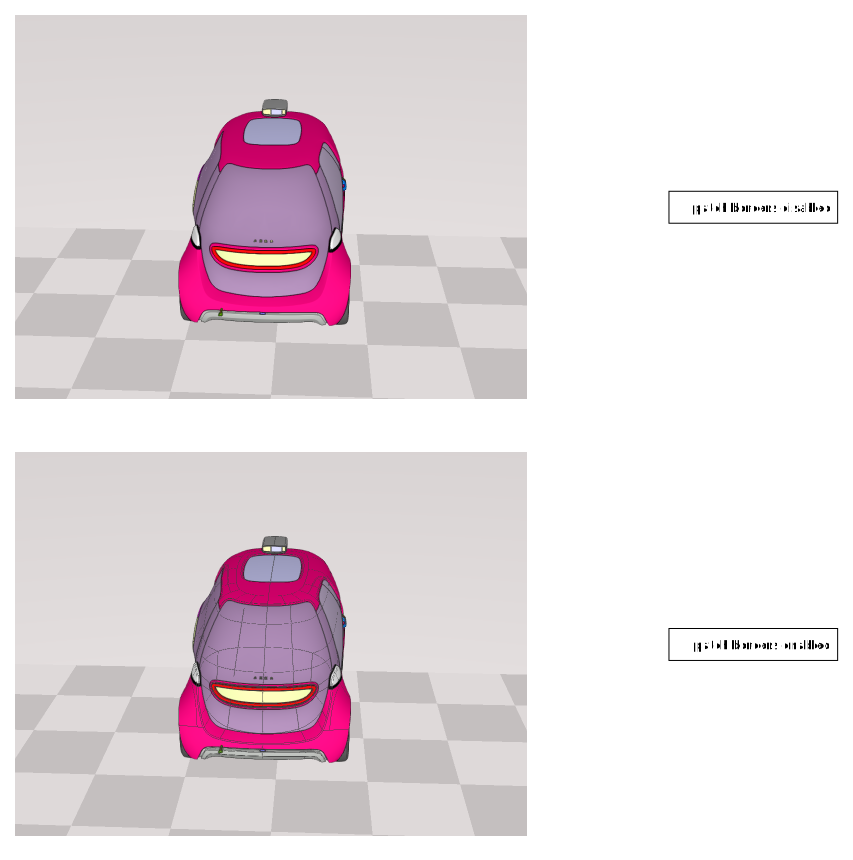
This is the same call as setPatchBordersEnabled.Parameters
- pEnable: booleaninIf set, enables the patch borders rendering mechanism.
Returns boolean
trueif the call succeeded.- pEnable: boolean
fromJSON
- fromJSON(pEngineData): boolean
Sets the content of the InfiniteEngineInterface from a former call to toJSON.
InfiniteEngineInterface parameters (Cut-planes and camera definitions) may be streamed, using the following schema :
{
"$defs": {
"camera": {
"additionalProperties": false,
"description": "Define the values of a Camera",
"properties": {
"coi": {
"$ref": "#/$defs/vec3"
},
"dvector": {
"$ref": "#/$defs/vec3"
},
"frontdir": {
"$ref": "#/$defs/vec3"
},
"location": {
"$ref": "#/$defs/vec3"
},
"projection": {
"$ref": "#/$defs/cameraprojection"
},
"rvector": {
"$ref": "#/$defs/vec3"
},
"topdir": {
"$ref": "#/$defs/vec3"
},
"uvector": {
"$ref": "#/$defs/vec3"
}
},
"required": [
"location",
"dvector",
"uvector",
"rvector",
"coi",
"frontdir",
"topdir",
"projection"
],
"title": "Camera definition",
"type": "object"
},
"cameracontroller": {
"additionalProperties": false,
"description": "Define the values of a Camera controller",
"properties": {
"camera": {
"$ref": "#/$defs/camera"
},
"currentcameramode": {
"$ref": "#/$defs/cameramode"
},
"fly": {
"$ref": "#/$defs/flymode"
},
"orbit": {
"$ref": "#/$defs/orbitmode"
},
"version": {
"description": "Define the version of the object",
"example": 1,
"type": "integer"
}
},
"required": [],
"title": "Camera controller definition",
"type": "object"
},
"cameramode": {
"enum": [
"orbit",
"examine",
"none",
"fly"
],
"type": "string"
},
"cameraprojection": {
"additionalProperties": false,
"properties": {
"horizontal": {
"type": "boolean"
},
"isperspective": {
"type": "boolean"
},
"projectionvalue": {
"exclusiveMinimum": 0,
"type": "number"
}
},
"required": [
"isperspective",
"projectionvalue"
],
"title": "Camera projection definition",
"type": "object"
},
"cutplane": {
"additionalProperties": false,
"properties": {
"enabled": {
"default": true,
"description": "If disabled, this filter is completely ignored during all the computations",
"example": true,
"type": "boolean"
},
"group": {
"default": 0,
"description": "Cut planes may be grouped together. In that case, an area is considered 'cut' if ALL cut planes cut this area.",
"example": 0,
"maximum": 7,
"minimum": 0,
"type": "integer"
},
"normal": {
"$ref": "#/$defs/vec3"
},
"point": {
"$ref": "#/$defs/vec3"
}
},
"required": [
"enabled",
"point",
"normal"
],
"title": "Cut plane definition",
"type": "object"
},
"cutplanes": {
"additionalProperties": false,
"properties": {
"cutplanes": {
"items": {
"$ref": "#/$defs/cutplane"
},
"type": "array"
},
"type": {
"const": "cutplanes",
"type": "string"
},
"version": {
"description": "Define the version of the object",
"example": 1,
"type": "integer"
}
},
"required": [
"type",
"cutplanes"
],
"title": "Cut planes definition",
"type": "object"
},
"flymode": {
"additionalProperties": false,
"properties": {
"heightlocked": {
"type": "boolean"
},
"keymapping": {
"$ref": "#/$defs/flymode_keymapping"
},
"rotationspeed": {
"exclusiveMinimum": 0,
"type": "number"
},
"translationspeed": {
"exclusiveMinimum": 0,
"type": "number"
}
},
"required": [],
"title": "Fly mode definition",
"type": "object"
},
"flymode_keymapping": {
"additionalProperties": false,
"properties": {
"backward": {
"default": "KeyS",
"type": "string"
},
"down": {
"default": "KeyF",
"type": "string"
},
"forward": {
"default": "KeyW",
"type": "string"
},
"left": {
"default": "KeyA",
"type": "string"
},
"right": {
"default": "KeyD",
"type": "string"
},
"shift": {
"default": "ShiftLeft",
"type": "string"
},
"up": {
"default": "KeyR",
"type": "string"
},
"version": {
"description": "Define the version of the object",
"example": 1,
"type": "integer"
}
},
"required": [],
"title": "Fly mode key mapping definition",
"type": "object"
},
"orbitmode": {
"additionalProperties": false,
"properties": {
"controllersensitivity": {
"exclusiveMinimum": 0,
"type": "number"
},
"upconstraint": {
"type": "boolean"
}
},
"required": [],
"title": "Orbit mode definition",
"type": "object"
},
"renderingcontext": {
"additionalProperties": false,
"properties": {
"cameracontrollerdefinition": {
"$ref": "#/$defs/cameracontroller"
},
"cutplanesdefinition": {
"$ref": "#/$defs/cutplanes"
},
"rendering": {
"$ref": "#/$defs/renderingproperties"
},
"type": {
"const": "renderingcontext",
"description": "Type of context",
"type": "string"
},
"version": {
"description": "Define the version of the object",
"example": 1,
"type": "integer"
}
},
"required": [
"type",
"version"
],
"type": "object"
},
"renderingmode": {
"enum": [
"default",
"flat_shading"
],
"type": "string"
},
"renderingproperties": {
"additionalProperties": false,
"properties": {
"antialiasing": {
"type": "boolean"
},
"background": {
"maxLength": 9,
"pattern": "^#[0-9a-fA-F]{8}|ground$",
"type": "string"
},
"edgedetect": {
"type": "boolean"
},
"patchborders": {
"type": "boolean"
},
"renderingmode": {
"$ref": "#/$defs/renderingmode"
},
"type": {
"const": "renderingproperties",
"type": "string"
},
"version": {
"description": "Define the version of the object",
"example": 1,
"type": "integer"
}
},
"required": [
"type"
],
"type": "object"
},
"vec3": {
"description": "Define the coordinates [x,y,z] of a point / vector",
"items": {
"type": "number"
},
"maxItems": 3,
"minItems": 3,
"title": "3D Vector definition",
"type": "array"
}
},
"$ref": "#/$defs/renderingcontext",
"$schema": "https://json-schema.org/draft-07/schema#"
}
This schema may evolve in the future.Parameters
- pEngineData: string | ObjectinInternal InfiniteEngineInterface data to set.
Returns boolean
trueif the data is set.- pEngineData: string | Object
get
- get
Annotation Renderer(): AnnotationRendererInterface Gets the annotation renderer.
The annotation renderer is there to include and display annotations in the 3D view.
Please see Annotations for more explanations about annotations.
Returns AnnotationRendererInterface
The AnnotationRendererInterface of the given InfiniteEngineInterface.
get
- get
Background(pBackgroundColor): boolean Gets the current background.
If the background is a grid then getBackgroundColor returns false and pBackgroundColor is left intact.
If the background is a color then getBackgroundColor returns true and pBackgroundColor is set with the current background color.
Parameters
- pBackgroundColor: Vector4outThe current background color (if the background is a color).
Returns boolean
trueif the background is a color, false if it is a grid.- pBackgroundColor: Vector4
get
- get
Bind Session Progress(): number Gets the progress of the bindDataSession procedure.
Tells the amount of data that has been already loaded before the InfiniteEngineInterfaceSignal.DataSessionLoaded signal will be called. This returns a value in the range [0, 1], 1 meaning the InfiniteEngineInterfaceSignal.DataSessionLoaded signal has already been sent.
Returns number
The current progress of the bindDataSession procedure.
get
- get
Bound Data Session(): DataSessionInterface Gets the current bound DataSessionInterface to this engine.
Returns DataSessionInterface
The current bound DataSessionInterface.
get
- get
Camera Manager(): CameraManagerInterface Gets the CameraManagerInterface, useful to control the camera in the scene.
Returns CameraManagerInterface
The CameraManagerInterface used to manipulate the camera.
get
- get
Current GeometricAABB(pGeometricInstanceId, pAABBOut): boolean Gets the current axis aligned bounding box of the given
geometric instance id.This returns the AABB that may be transformed of the given geometric instance id has been moved.
Returns true if the given
geometric instance idis valid.Parameters
- pGeometricInstanceId: numberinThe
geometric instance idto query. - pAABBOut: AABBoutThe resulting AABB of the
geometric instance.
Returns boolean
trueif pAABBOut is updated.- pGeometricInstanceId: number
get
- get
Current Geometric Matrix(pGeometricInstanceId, pMatrixOut): boolean Gets the matrix of the given
geometric instance id.This may included the transformation set by addMatrix, setMatrix.
Returns true if the given
geometric instance idis valid.Parameters
- pGeometricInstanceId: numberinThe
geometric instance idto query. - pMatrixOut: Matrix4outThe resulting Matrix of the
geometric instance.
Returns boolean
trueif pMatrixOut is updated.- pGeometricInstanceId: number
get
- get
Current UnitedAABB(pGeometricInstanceIds, pAABBOut): boolean Computes the current axis aligned bounding box of the given
geometric instances.This consists in the union of all the AABB of the
geometric instancesexpressed by theirgeometric instance ids.Returns true if at least one
geometric instance idinside pGeometricInstanceIds is valid. Invalidgeometric instance idsare silently discarded.Parameters
- pGeometricInstanceIds: number[] | Uint32Arrayinthe list of
geometric instance idsto query. - pAABBOut: AABB
Returns boolean
trueif at least onegeometric instance idinside pGeometricInstanceIds is valid and pAABBOut is therefore updated.- pGeometricInstanceIds: number[] | Uint32Array
get
- get
Cut Plane Manager(): CutPlaneManagerInterface Gets the CutPlaneManagerInterface.
The CutPlaneManagerInterface is used to create/manipulate cut planes.
Returns CutPlaneManagerInterface
The CutPlaneManagerInterface used to manipulate cut planes.
get
- get
Default Hardware Instancing Usage(): boolean Tells if hardware instancing should be used is case InfiniteEngineViewType.options.useHardwareInstancing is not set (neither
truenorfalse) when calling setView.Hardware instancing is a hardware rendering optimization.
getDefaultHardwareInstancingUsageis set totrueas default.setDefaultHardwareInstancingUsage is there to change the default value of InfiniteEngineViewType.options.useHardwareInstancing.
Returns boolean
The default hardware instancing usage value.
get
- get
Default Vertex Array Objects Usage(): boolean Tells if Vertex Array Objects should be used is case InfiniteEngineViewType.options.useVertexArrayObjects is not set (neither
truenorfalse) when calling setView.Vertex Array Objects are specific rendering objects that allows a significant reduction in function calls when rendering objects. They are not available in webgl1.
getDefaultVertexArrayObjectsUsageis set totrueas default.setDefaultVertexArrayObjectsUsage is there to change the default value of InfiniteEngineViewType.options.useVertexArrayObjects.
Returns boolean
The default Vertex Array Objects usage value.
get
- get
Feature Manager(): FeatureManagerInterface Gets the FeatureManagerInterface.
The FeatureManagerInterface allows access to the creation of 3D points, 3D lines, 3D boxes and 2D rectangles.
Returns FeatureManagerInterface
The FeatureManagerInterface used to manipulate 3D points, 3D lines, 3D boxes and 2D rectangles.
get
- get
Fixed Resolution(pResolution): boolean Tells if setFixedResolution is in use at the moment, and gets the fixed resolution is setFixedResolution is in use.
If setFixedResolution(pWidth, pHeight, pWindowRatio) is in use, pResolution.x will be equal to Math.ceil(pWidth), pResolution.y will be equal to Math.ceil(pHeight), and pResolution.z will be equal to pWindowRatio and true is returned.
If setFixedResolution is not in use, false is returned and pResolution is left as is.
Parameters
- pResolution: Vector3outThe fixed resolution parameters if setFixedResolution has been called.
Returns boolean
trueif setFixedResolution is in use, else false.- pResolution: Vector3
get
- get
Geometric State(pGeometricId): number Gets the visual state (Visible/hide/Ghost/Ignore cut plane) of the given
geometric instance id.The visual state is a bit field that allows to change a lot of
geometric instance idsat once.Parameters
- pGeometricId: numberinThe
geometric instance idof the element to get.
Returns number
The visual state of the given element, 0 is the element is invalid.
See
- pGeometricId: number
get
- get
Infinite Object Type(): InfiniteObjectType Tells the type of the given interface.
Returns InfiniteObjectType
The type of the given interface.
get
get
- get
Material Manager(): MaterialManagerInterface Gets the MaterialManagerInterface.
The MaterialManagerInterface is used to change/restore the color of instances.
Returns MaterialManagerInterface
The MaterialManagerInterface used to change colors of instances.
get
- get
Performance(): InfiniteEnginePerformanceInterface Gets the performance infos to tweak the InfiniteEngineInterface performance.
Returns InfiniteEnginePerformanceInterface
The InfiniteEnginePerformanceInterface that handle the InfiniteEngineInterface performance.
get
- get
Primitive Manager(): PrimitiveManagerInterface Gets the PrimitiveManagerInterface.
The PrimitiveManagerInterface allows access to the creation of 3D points, 3D lines, 3D boxes and 2D rectangles.
Returns PrimitiveManagerInterface
The PrimitiveManagerInterface used to manipulate 3D points, 3D lines, 3D boxes and 2D rectangles.
get
- get
Rendering Mode(): RenderingMode Gets the rendering mode in use for shading.
Returns RenderingMode
The current rendering mode.
get
- get
Resource Loading Progress(): number Gets the HD data loading progress of the engine.
Tells the amount of data that has been already loaded before the HD loading procedure will stop. This returns a value in the range [0, 1], 1 meaning the HD loading procedure is over.
This does not tell the amount of data that will be required to fully load the current point of view if resources were sufficient.
Returns number
The current HD data loading progress of the engine.
get
- get
Resource Loading State(): LoadingStates Gets the loading state of the engine.
Tells if the engine has finished loading resources and if so, if the budget was sufficient to load all required data.
Returns LoadingStates
The LoadingStates of the engine.
get
- get
Transformed Instances(pInstances): boolean Gets the instances that have been transformed.
Any instance that has been transformed with addMatrix or setMatrix will be included in
pInstances.Parameters
- pInstances: number[]outThe list of transformed instances.
Returns boolean
trueif the call succeeded (i.e.pInstancesis of the correct expected type).- pInstances: number[]
get
get
- get
VisualAABB(pBitMask, pBitValue, pAABB): boolean Computes the Axis Aligned Bounding Box of geometries which have the specified visual state.
Each geometry visual state is intersected with the pBitMask. If the resulting value is pBitValue then the geometry bounding box will be used in the computation.
Example : computing the axis aligned bounding box of visible geometries :
/**
* Sample to illustrate the computing of the AABB of the visible `geometric instances`.
*/
import { InfiniteEngineInterface, VisualStates, AABB } from 'generated_files/documentation/appinfiniteapi';
// created previously
let lInfiniteEngine : InfiniteEngineInterface;
// to get the result of the AABB computation
const lVisibleAABB : AABB = new AABB();
// we need to check only visible / hidden flag
const lBitMask : number = VisualStates.S_Hidden;
// we want to get all geometries that are not hidden (~VisualStates.S_Hidden)
// easier with 0 :)
const lVisibleValueBit : number = 0;
// compute the AABB of visible geometries :
lInfiniteEngine.getVisualAABB(lBitMask, lVisibleValueBit, lVisibleAABB);
Please refer to the VisualStates for a list of possible values.Parameters
- pBitMask: numberinthe bit mask ("ORed" value of the VisualStates) of the states to check.
- pBitValue: numberinthe bit value ("ORed" value of the VisualStates) of the states that will be checked.
- pAABB: AABBoutthe computed AABB for the given bit composition of VisualStates.
Returns boolean
trueif at least one geometry is involved in the computation, else pAABB is left unchanged and false is returned.- pBitMask: number
get
getXRFrame
- getXRFrame(): any
(WebXR) Gets the current XRFrame.
The XRFrame is valid only during the time of the rendering loop, you may access the given frame only when connecting to CameraManagerInterface events, or InfiniteEngineInterfaceSignal.DisplayDone.
If the session is not an XRSession, or if called outside of the rendering loop, returns undefined.
Returns any
The current XRFrame if called inside the rendering loop in an XR session, else undefined.
getXRSession
has
- has
Event Listener(pType, pListener): boolean Tells if the EventDispatcher has such a callback registered for the given event type.
Parameters
- pType: stringinThe type of the event to test.
- pListener: tListenerCallbackinThe listener function that gets tested.
Returns boolean
trueif such a listener is installed for the given type of event.- pType: string
has
is
is
- is
Copyrighted Watermark Enabled(): boolean Tells if the copyrighted watermark is enabled.
The copyrighted watermark is the information provided on the bottom right of the rendering that tells about the authors of the javascript API :) .
This is set by enableCopyrightedWatermark.Returns boolean
trueif the copyrighted watermark is enabled.
is
- is
Disposed(): boolean Tells if this object has been gotten rid off.
Returns boolean
trueif dispose has been called on this object.
is
is
- is
Loaded(): boolean Tells if the Infinite engine interface is ready to be used (i.e. all necessary data has been loaded from the data session).
Depending on the case, DataSessionInterfaceSignal.DMULoadingSuccess and InfiniteEngineInterfaceSignal.DataSessionLoaded may be called at a different time, depending on when bindDataSession is called.
Returns true if bindDataSession has been called, the DataSessionInterfaceSignal.DMULoadingSuccess has been called, and InfiniteEngineInterfaceSignal.DataSessionLoaded has been called.
Returns boolean
trueif all initialization data have been parsed.
is
is
- is
Using Hardware Instancing(): boolean Tells is the InfiniteEngineInterface is currently using hardware instancing.
Hardware instancing is a hardware rendering optimization that is likely enabled when setting InfiniteEngineViewType.options.useHardwareInstancing.
Hardware instancing may cause trouble on some defect or very old graphic drivers.
isUsingHardwareInstancingwill returnfalseif setView has not be called or setView(undefined).Returns boolean
trueif hardware instancing is currently in use.
is
- is
Using Vertex Array Objects(): boolean Tells is the InfiniteEngineInterface is currently using vertex array objects.
Vertex Array Objects are specific rendering objects that allows a significant reduction in function calls when rendering objects. They are not available in webgl1. Vertex Array Objects are used when setting InfiniteEngineViewType.options.useVertexArrayObjects.
They may cause trouble on some defect or very old graphic drivers.
isUsingVertexArrayObjectswill returnfalseif setView has not be called or setView(undefined).Returns boolean
trueif Vertex Array Objects are currently in use.
pick
- pick
At(pX, pY, pPickOnlyClosest): boolean Requests an asynchronous pick in the 3D at coordinates [pX,pY] (
(0,0)is on the upper left of screen).Fires the event InfiniteEngineInterfaceSignal.Picked when the result is ready. Attachment is a PickingAttachment. Please use getLastPickingRequestId to know the pick request id in case of multiple pick requests.
If
pPickOnlyClosestistrue, then only the closest item under the picked point will be included, discarding other types of data if relevant.Parameters
- pX: numberinNumber between 0 and view3d.width-1, origin is the left side of the view (as retrieved from the MouseEvent).
- pY: numberinNumber between 0 and view3d.height-1, origin is the upper side of the view (as retrieved from the MouseEvent).
- pPickOnlyClosest: booleaninIf set, only closest item(s) will be retrieved.
Returns boolean
trueif [pX pY] is inside the 3D area.- pX: number
pick
- pick
From Ray(pOrigin, pDirection, pPickOnlyClosest): boolean Requests an asynchronous pick in the 3D from a 3D ray.
The 3D is not required to come from the position of the camera, but the ray must be oriented toward the direction of the camera (the dot vector between the direction of the camera and the direction of the ray must be positive). The ray is a half line that comes from the origin and follows the direction to the infinity.
Fires the event InfiniteEngineInterfaceSignal.Picked when the result is ready. Attachment is a PickingAttachment. Please use getLastPickingRequestId to know the pick request id in case of multiple pick requests.
If
pPickOnlyClosestistrue, then only the closest item under the picked ray will be included, discarding other types of data if relevant./**
* Sample to illustrate the handling of a 3d ray pick in an InfiniteEngineInterface.
*/
import {
InfiniteEngineInterface, InfiniteFactory, PickingAttachment, PickingAttachmentItem,
Vector3, VisualStates, InfiniteEngineInterfaceSignal, InfiniteEvent
} from 'generated_files/documentation/appinfiniteapi';
// the div to render to
let lView3D: HTMLElement;
// create an 3D engine
const lInfiniteEngine: InfiniteEngineInterface = InfiniteFactory.CreateInfiniteEngine();
// What to do on pick ?
let onPicking : (pEvent : InfiniteEvent, _pCallbackData) => void = undefined;
// created previously : the origin of the 3D ray to pick from
let lPickRayOrigin : Vector3;
// created previously : the direction of the 3D ray to pick from
let lPickRayDirection : Vector3;
// bind the 3D rendering to the div
lInfiniteEngine.setView(lView3D);
// ####################################################################################################################################
// ############################################ PICKING ###############################################################################
// ####################################################################################################################################
// What to do on pick ?
onPicking = (pEvent : InfiniteEvent, _pCallbackData) : void =>
{
const lAttachment: PickingAttachment = <PickingAttachment>pEvent.attachments;
// care only about 3d geometries (no line, point, box)
const l3dAttachment: PickingAttachmentItem[] | undefined = lAttachment.geometric;
let lFirstGeometricId: number = 0;
let l3dPosition: Vector3 | undefined = undefined;
if (l3dAttachment !== undefined && l3dAttachment.length > 0)
{
lFirstGeometricId = l3dAttachment[0].instanceId;
l3dPosition = l3dAttachment[0].position;
}
// clear selected state on pick
let lWasSelected: boolean = false;
if (lFirstGeometricId !== 0)
{
const lGeomState = lInfiniteEngine.getGeometricState(lFirstGeometricId);
lWasSelected = ((lGeomState & VisualStates.S_Selected) !== 0);
}
// if multiple selections => do not change the selected state of a single geometry
// but select all the relevant 3D data instead
if (l3dAttachment && l3dAttachment.length > 1)
{
lWasSelected = false;
}
// unselect everyone
lInfiniteEngine.updateGeometricStateForAll(VisualStates.S_Selected, ~VisualStates.S_Selected);
// and begin
if (lFirstGeometricId !== 0 && !lWasSelected && l3dAttachment)
{
// update visual state of selected items
const lIds = new Uint32Array(l3dAttachment.length);
for (let i = 0; i < l3dAttachment.length; i += 1) {
lIds[i] = l3dAttachment[i].instanceId;
}
lInfiniteEngine.updateGeometricState(lIds, VisualStates.S_Selected, VisualStates.S_Selected);
}
};
// and bind the callback on pick result
lInfiniteEngine.addEventListener(InfiniteEngineInterfaceSignal.Picked, onPicking);
// pick from a 3d Ray
lInfiniteEngine.pickFromRay(lPickRayOrigin, lPickRayDirection, false);
There are some limitations to the 3D ray pick : * Only 3D elements actually rendered may be picked (no ray pick outside the frustum). * The pick ray algorithm rely on the projection of the surfaces to the near plane, objects that are less than 2 pixels wide and 2 pixels high cannot be picked.Parameters
Returns boolean
trueif the picking request is accepted and a pick result will be received soon.
pick
- pick
Rect(pRectangle, pPickOnlyClosest): boolean Requests an asynchronous pick in the 3D from a screen space rectangle.
(0,0) is on the upper left of screen. Fires the event InfiniteEngineInterfaceSignal.Picked when the result is ready. Attachment is a PickingAttachment. Please use getLastPickingRequestId to know the pick request id in case of multiple pick requests.
If
pPickOnlyClosestistrue, then only the closest items under the picked rectangle will be included, discarding other types of data if relevant.Parameters
- pRectangle: Rectangleinthe screen space rectangle to pick from. Origin of the screen is the top-left of the view (as retrieved from the MouseEvent).
- pPickOnlyClosest: booleaninIf set, only closest items will be retrieved.
Returns boolean
trueif the rectangle is valid and not empty.- pRectangle: Rectangle
project
- project
To Screen(pPoint, pScreenCoordinatesOut): boolean Projects the given 3D point on the screen.
The resulting screen coordinates in pScreenCoordinatesOut are normalized between
0and1,(0,0)is the upper left of screen,(1,1)is the bottom right of screen.Parameters
Returns boolean
trueif the view3D was set and if the point can be projected onto the screen.
remove
remove
- remove
Event Listener(pType, pListener, pObject): boolean Removes a listener from an event type.
If no such listener is found, then the function returns false and does nothing. You must use the exact parameters that were used in addEventListener to actually remove the listener.
Parameters
- pType: stringinThe type of the listener that gets removed.
- pListener: tListenerCallback
The listener function that gets removed.
- pObject: Object
The listener object that was used when addEventListener was called.
Returns boolean
trueif the callback was removed else false.- pType: string
- remove
Event Listener(pType, pListener): boolean Removes a listener from an event type.
If no such listener is found, then the function returns false and does nothing. You must use the exact parameters that were used in addEventListener to actually remove the listener.
Parameters
- pType: stringinThe type of the listener that gets removed.
- pListener: tListenerCallback
The listener function that gets removed.
Returns boolean
trueif the callback was removed else false.- pType: string
remove
- remove
Event Listener By Id(pId): boolean Removes a listener by its id.
If no such listener is found, then the function returns false and does nothing. You must use the return value of addEventListener to actually remove the listener.
Parameters
- pId: stringinThe id returned by the call to addEventListener that you want to remove.
Returns boolean
trueif the callback was removed else false.- pId: string
restore
restore
- restore
Original Matrix(pGeometricInstanceIds): boolean Restores all the given
geometric instancesto their original positions.The transform will be restored for the given
geometric instances.Returns
trueif at least onegeometric instance idinside pGeometricInstanceIds is valid. Invalidgeometric instance idsare silently discarded.Parameters
- pGeometricInstanceIds: number | number[] | Uint32ArrayinThe list of
geometric instance idsto query.
Returns boolean
trueif at least onegeometric instance idinside pGeometricInstanceIds is valid.- pGeometricInstanceIds: number | number[] | Uint32Array
screenshot
- screenshot(pScreenshotType, pInBase64, pFormat?, pQuality?): string
Triggers an asynchronous screenshot request.
The current image of the display is grabbed (without the navigation cube and manipulators such as cut plane manipulators), or the geometric instance ids, depending on the screenshot request type, and a screenshot request id is returned. An invalid screenshot request is an empty string.
If the screenshot request can be started, then a InfiniteEngineInterfaceSignal.ScreenshotReady signal will be fired shortly after.
The resulting screenshot data will be base64 encoded if pInBase64 is set to
true(InfiniteImageInterface.data will be a string, else a UInt8Array).When using ScreenshotType.ST_Color,
pFormattells the resulting format of the data, 'image/png' is by default. Available formats are the same as theHTMLCanvasElement.toDataURL()orHTMLCanvasElement.toBlob()calls. The API adds the 'image/raw' format to deal with individual pixels if requested (without image encoding).pQualityis a number in the [0,1] range, telling the expected quality if the requested format is a lossy compression scheme, such as 'image/jpeg'. If the requested format is not handled by the browser, 'image/png' type will be used.When using other formats,
pFormatandpQualityare ignored.If pInBase64 is true, you may create a data url with the following code :
/**
* Sample to illustrate the screenshot procedure of the InfiniteEngineInterface.
*/
import {
InfiniteEngineInterface, LoadingStates, Vector3, InfiniteEngineLoadingStateAttachment,
InfiniteEngineInterfaceSignal, InfiniteEvent, InfiniteImageInterface, ScreenshotType
} from 'generated_files/documentation/appinfiniteapi';
// We try to make a screenshot when all data is loaded
// the div to render the 3D display
let lView3D: HTMLElement;
// created previously, should receive the image data to be displayed to the user (or ask for a download maybe ?)
let lImageData : HTMLImageElement;
// created previously the position of the camera for the screenshot
let lCameraLocation : Vector3;
// created previously the camera center of interest
let lCenterOfInterest : Vector3;
// created previously the 3D engine
let lInfiniteEngine: InfiniteEngineInterface;
let lScreenshotId : string = '';
// What to do when screenshot is ready ?
let onScreenshotReady : (pEvent : InfiniteEvent, _pCallbackData) => void = undefined;
// What to do when all data is loaded ?
let onDataStateChanged : (pEvent : InfiniteEvent, _pCallbackData) => void = undefined;
// bind the 3D rendering to the div (should have been done earlier :) )
lInfiniteEngine.setView(lView3D);
// we will make screenshot of 1024x1024
lInfiniteEngine.setFixedResolution(1024, 1024, 1);
lInfiniteEngine.addEventListener(InfiniteEngineInterfaceSignal.LoadingStateChanged, onDataStateChanged);
lInfiniteEngine.addEventListener(InfiniteEngineInterfaceSignal.ScreenshotReady, onScreenshotReady);
// go to the expected position / location
lInfiniteEngine.getCameraManager().setCameraLocation(lCameraLocation);
lInfiniteEngine.getCameraManager().lookAt(lCenterOfInterest, 0);
// ####################################################################################################################################
// ############################################ Screenshot ############################################################################
// ####################################################################################################################################
// What to do when state changes ? We wait till everything is loaded and then make a screenshot
onDataStateChanged = (pEvent : InfiniteEvent, _pCallbackData) : void =>
{
// check the attachment
const lStateAttachment : InfiniteEngineLoadingStateAttachment = pEvent.attachments;
// some check, but useless, only for illustration purpose
console.assert(lStateAttachment.newLoadingState === lInfiniteEngine.getResourceLoadingState());
switch (lStateAttachment.newLoadingState)
{
case LoadingStates.S_Loading:
// do nothing if we are still loading
return;
case LoadingStates.S_OutOfBudget:
// some fancy message
console.log('Taking a screenshot without everything loaded');
// but we still make a screenshot :)
break;
default:
break;
}
// make a screenshot request in jpeg with 95% quality, data will be base64 encoded
lScreenshotId = lInfiniteEngine.screenshot(ScreenshotType.ST_Color, true, 'image/jpeg', 0.95);
if (lScreenshotId.length === 0)
{
// for some reason, this failed
console.log('Screenshot request failed');
}
};
// what to do when we get the screenshot result ?
onScreenshotReady = (pEvent : InfiniteEvent, _pCallbackData) : void =>
{
// the image result
const lInfiniteImage : InfiniteImageInterface = pEvent.attachments;
// if the id does not match, bail out
if (lInfiniteImage.screenshotid !== lScreenshotId)
{
console.log('This is not the expected screenshot id, aborting');
return;
}
// is the image valid ? and base64 encoded ?
if ((lInfiniteImage.width === 0) || (!lInfiniteImage.data) || (!lInfiniteImage.base64))
{
console.log('Unexpected screenshot error, aborting');
return;
}
// create the data url in base64
// even if we did not get the expected format, we still get the result
const lDataUrl : string = 'data:' + lInfiniteImage.format + ';base64,' + lInfiniteImage.data;
// resize the image markup
lImageData.width = lInfiniteImage.width;
lImageData.height = lInfiniteImage.height;
// and set data
lImageData.src = lDataUrl;
// we get back to the size of the 3d view but this is up to the application needs
lInfiniteEngine.unsetFixedResolution();
};
Making a color screenshot.Parameters
- pScreenshotType: ScreenshotTypeinThe request screenshot type (image, geometric instance ids, etc).
- pInBase64: booleaninIf set to true, InfiniteImageInterface.data will be a base64 string.
OptionalpFormat: stringinThe expected format of the resulting screenshot data ('image/png' by default).OptionalpQuality: numberinThe expected quality of the resulting screenshot data, in the [0,1] range in case of lossy compression formats.
Returns string
A unique screenshot id request, or an empty string in case of error.
- pScreenshotType: ScreenshotType
set
- set
Anti Aliasing Enabled(pEnable): boolean Enables / disables anti aliasing.
Anti aliasing is disabled by default.
This is the same call as enableAntiAliasing.
Parameters
- pEnable: booleaninIf set, enables the anti aliasing.
Returns boolean
trueis the call succeeded.- pEnable: boolean
set
- set
Background(pUseBackgroundColor, pBackgroundColor?): boolean Sets the background to be used in the rendering.
The background of the rendering scene can be either a grid or a plain color. The grid is the default background. If pUseBackgroundColor is true the background shows the given color pBackgroundColor (R,G,B,A in the range [0,1]).
Returns true if the background has been set. Setting pUseBackgroundColor to true without a valid color is invalid.
Parameters
- pUseBackgroundColor: booleaninIf true shows the given pBackgroundColor else shows the ground and pBackgroundColor is ignored.
OptionalpBackgroundColor: Vector4inPlain color used if the pShowBackground is set to false.
Returns boolean
trueif the background has been successfully set.- pUseBackgroundColor: boolean
set
- set
Copyrighted Watermark Enabled(pEnabled): boolean Enables / disables the copyrighted watermark.
The copyrighted watermark is the information provided on the bottom right of the rendering that tells about the authors of the javascript API :) .
The copyrighted watermark is enabled by default.This is the same call as enableCopyrightedWatermark.
Parameters
- pEnabled: booleaninIf set, enables the copyrighted watermark on the rendering.
Returns boolean
trueif the call succeeded.- pEnabled: boolean
set
- set
Default Hardware Instancing Usage(pEnable): void Sets the default value of hardware instancing usage.
getDefaultHardwareInstancingUsage is set to
trueas default.This parameter will set if hardware instancing should be used is case InfiniteEngineViewType.options.useHardwareInstancing is not set (neither
truenorfalse) when calling setView.setDefaultHardwareInstancingUsageis there to change the default value of InfiniteEngineViewType.options.useHardwareInstancing.Hardware instancing is a hardware rendering optimization.
Parameters
- pEnable: booleaninThe new default hardware instancing value.
Returns void
- pEnable: boolean
set
- set
Default Vertex Array Objects Usage(pEnable): void Sets the default value of Vertex Array Objects usage.
getDefaultVertexArrayObjectsUsage is set to
trueas default.This parameter will set if hVertex Array Objects should be used is case InfiniteEngineViewType.options.useVertexArrayObjects is not set (neither
truenorfalse) when calling setView.setDefaultVertexArrayObjectsUsageis there to change the default value of InfiniteEngineViewType.options.useVertexArrayObjects.Vertex Array Objects are specific rendering objects that allows a significant reduction in function calls when rendering objects. They are not available in webgl1.
Parameters
- pEnable: booleaninThe new default Vertex Array Objects usage value.
Returns void
- pEnable: boolean
set
- set
Edge Detect Enabled(pEnable): boolean Enables / disables edge detection mechanism.
Edge detection is disabled by default.
This is the same call as enableEdgeDetect.
Parameters
- pEnable: booleaninIf set, enables the edge detection mechanism.
Returns boolean
trueif the call succeeded.- pEnable: boolean
set
- set
Fixed Resolution(pWidth, pHeight, pWindowRatio): boolean Sets the overridden rendering resolution of the rendering "window".
If the HTMLElement set with the setView call (
HTMLViewElement) has not the same aspect ratio, then the 3d display is centered inside the givenHTMLViewElement, showing the background color of theHTMLViewElement.If the resolution is superior to the size of the
HTMLViewElement, the rendering is scaled down to the available size.The 3D objects are rendered with ceil(pWidth) by ceil(pHeight) resolution, but you may want to have more precision on the displayed texts of annotations. For these reason, texts are rendered on an area of ceil(pWidth * pWindowRatio) by ceil(pHeight * pWindowRatio), allowing to have maximum performance on the 3D displayed objects and texts still readable.
Screenshot request will have a resolution of ceil(pWidth * pWindowRatio) by ceil(pHeight * pWindowRatio).
Parameters
- pWidth: numberinThe maximum number of horizontal pixels for the rendering window (valid values are > 0).
- pHeight: numberinThe maximum number of vertical pixels for the rendering window (valid values are > 0).
- pWindowRatio: numberinThe new window ratio for rendering texts (must be superior or equal to 1).
Returns boolean
trueif the fixed resolution has been set and the 3 parameters are valid.- pWidth: number
set
- set
Matrix(pGeometricInstanceIds, pMatrix): boolean Transforms the given
geometric instancesto the given matrix.The transform will be set for the given
geometric instances, discarding any position previously set by addMatrix and the original matrices of the instances.Returns
trueif at least onegeometric instance idinsidepGeometricInstanceIdsis valid and thus modified. Floating point numbers are considered invalid, and numbers outside the range of valid geometric instance ids are silently discarded (such numbers are not considered invalid, they are just discarded). Invalid geometric instance ids are also values that are not numbers. Invalid geometric instance ids are discarded, and if all values are discarded, the function returnsfalse.Parameters
- pGeometricInstanceIds: number | number[] | Uint32Arrayinthe list of
geometric instance idsto query. - pMatrix: Matrix4inthe transformation to set to the current geometry position.
Returns boolean
trueif at least onegeometric instance idinside pGeometricInstanceIds is modified.- pGeometricInstanceIds: number | number[] | Uint32Array
set
- set
Maximum Engine Resolution(pWidth, pHeight): boolean Sets the maximum resolution of the rendering "window".
On some High DPI devices, the rendering size of the canvas may be too big to have a correct frame rate. You may choose to limit the maximum resolution to increase performance. The default maximum resolution is set to 1920 * 1080.
Parameters
- pWidth: numberinThe maximum number of horizontal pixels for the rendering window.
- pHeight: numberinThe maximum number of vertical pixels for the rendering window.
Returns boolean
trueif the call succeeded.- pWidth: number
set
- set
Patch Borders Enabled(pEnable): boolean Enables / disables patch borders mechanism.
Patch borders are disabled by default.
This is the same call as enablePatchBorders.Parameters
- pEnable: booleaninIf set, enables the patch borders rendering mechanism.
Returns boolean
trueif the call succeeded.- pEnable: boolean
set
- set
Rendering Mode(pRenderingMode): boolean Sets the rendering mode to use for shading.
Returns
trueif pRenderingMode is a correct rendering mode. It also returns true if the rendering mode is unchanged by the call.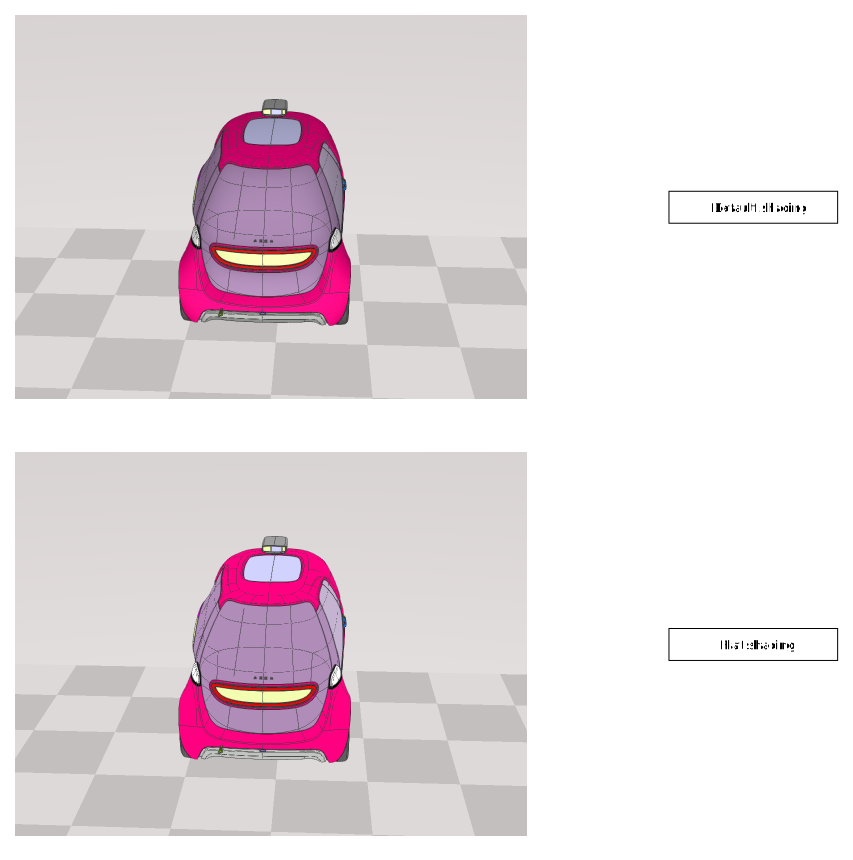
Available rendering modes.Parameters
- pRenderingMode: RenderingModeinThe new rendering mode to set.
Returns boolean
trueif call was successful.- pRenderingMode: RenderingMode
set
- set
View(pView, pForceEngineType?): boolean Sets the HTML element to be used to render the DMU.
The view style will be altered with a
position:relative.If InfiniteEngineViewType.options.useHardwareInstancing is not set (neither
truenorfalse), then hardware instancing is set if getDefaultHardwareInstancingUsage istrue. Hardware instancing is a hardware rendering optimization. Hardware instancing may cause trouble on some defect or very old graphic drivers.If InfiniteEngineViewType.options.useVertexArrayObjects is not set (neither
truenorfalse), then Vertex Array Objects are used if getDefaultVertexArrayObjectsUsage istrue. Vertex Array Objects are specific rendering objects that allows a significant reduction in function calls when rendering objects. They may cause trouble on some defect or very old graphic drivers.Parameters
- pView: HTMLElementinThe HTML element to render the DMU into.
OptionalpForceEngineType: InfiniteEngineViewTypeinIf set, the rendering can be forced to webgl1 or webxr (see InfiniteEngineViewType). When requesting a webxr session, pView must be set to undefined.
Returns boolean
trueif the 3D view is set.- pView: HTMLElement
toJSON
- toJSON(pKey?): Object
Gets a deep copy of the internal data of the InfiniteEngineInterface.
Cut-planes and camera definitions are dumped.
Please refer to JSON.stringify.
Parameters
OptionalpKey: anyinUnused.
Returns Object
The internal InfiniteEngineInterface data.
See
unset
- unset
Fixed Resolution(): void Restores the rendering to use the HTMLElement set with the setView as the full display area.
This function is the opposite to the setFixedResolution call.
Returns void
update
- update
Geometric State(pGeometricIds, pBitMask, pBitValue): boolean Sets the visual state (Visible/hide/Ghost/Ignore cut plane) of
geometric instance ids.The visual state is a bit field that allows to change a lot of
geometric instance idsat once.The bit mask is used to tell which bits will be changed by the function call (the use may want to preserve the ghost state of the
geometric instancesfor example).The bit value tells the value to set (bits not set by the mask will not be altered).
/**
* Sample to illustrate how to change the visibility of a set of `geometric instances`.
*/
import { InfiniteEngineInterface, VisualStates } from 'generated_files/documentation/appinfiniteapi';
// created previously
let lInfiniteEngine : InfiniteEngineInterface;
// 8 bits for visibility
// sets all instances visible and not ghosted (do not care about "x" values)
// Mask => xxxx 1101
//
// not ghosted => xxxx x0xx
// not hidden (visible) => xxxx 0xx0
// we want to set => xxxx 00x0
// we can use 0 for values !!!!
lInfiniteEngine.updateGeometricStateForAll(VisualStates.S_Ghost | VisualStates.S_Hidden, 0);
// sets 2 instances hidden, but clear the ghost for them, and clear selection
// Mask => xxxx 1111
//
// not ghosted => xxxx x0xx
// hidden => xxxx 1xx1
// not selected => xxxx xx0x
// we want to set => xxxx 1001
// we can use VisualStates.S_Hidden for values !!!!
const lCurrentGeometries : Uint32Array = new Uint32Array(2);
lCurrentGeometries[0] = 57;
lCurrentGeometries[1] = 64;
lInfiniteEngine.updateGeometricState(lCurrentGeometries, VisualStates.S_Ghost | VisualStates.S_Hidden | VisualStates.S_Selected, VisualStates.S_Hidden);
Please refer to the VisualStates for a list of possible values.Parameters
- pGeometricIds: number[] | Uint32ArrayinThe
geometric instance idsthat will be changed by the function call. - pBitMask: numberinThe bit mask ("ORed" value of the VisualStates) of the states that will be altered.
- pBitValue: numberinThe bit value ("ORed" value of the VisualStates) of the states that will be set.
Returns boolean
trueif the call was issued.See
- pGeometricIds: number[] | Uint32Array
update
- update
Geometric State For All(pBitMask, pBitValue): boolean Sets the visual state (Visible/hide/Ghost/Ignore cut plane) of all the
geometric instances.The visual state is a bit field that allows to change a lot of
geometric instance idsat once.The bit mask is used to tell which bits will be changed by the function call (the use may want to preserve the ghost state of the
geometric instancesfor example).The bit value tells the value to set (bits not set by the mask will not be altered).
/**
* Sample to illustrate how to change the visibility of a set of `geometric instances`.
*/
import { InfiniteEngineInterface, VisualStates } from 'generated_files/documentation/appinfiniteapi';
// created previously
let lInfiniteEngine : InfiniteEngineInterface;
// 8 bits for visibility
// sets all instances visible and not ghosted (do not care about "x" values)
// Mask => xxxx 1101
//
// not ghosted => xxxx x0xx
// not hidden (visible) => xxxx 0xx0
// we want to set => xxxx 00x0
// we can use 0 for values !!!!
lInfiniteEngine.updateGeometricStateForAll(VisualStates.S_Ghost | VisualStates.S_Hidden, 0);
// sets 2 instances hidden, but clear the ghost for them, and clear selection
// Mask => xxxx 1111
//
// not ghosted => xxxx x0xx
// hidden => xxxx 1xx1
// not selected => xxxx xx0x
// we want to set => xxxx 1001
// we can use VisualStates.S_Hidden for values !!!!
const lCurrentGeometries : Uint32Array = new Uint32Array(2);
lCurrentGeometries[0] = 57;
lCurrentGeometries[1] = 64;
lInfiniteEngine.updateGeometricState(lCurrentGeometries, VisualStates.S_Ghost | VisualStates.S_Hidden | VisualStates.S_Selected, VisualStates.S_Hidden);
Please refer to the VisualStates for a list of possible values.Parameters
- pBitMask: numberinThe bit mask ("ORed" value of the VisualStates) of the states that will be altered.
- pBitValue: numberinThe bit value ("ORed" value of the VisualStates) of the states that will be set.
Returns boolean
trueif the call succeeded.See
- pBitMask: number
The InfiniteEngineInterface interface is used to render the content of the DMU.
The usage is very basic :
geometric instancesare rendered.WARNING : There is no automatic conversion of the content of WorkingSetInterface to the 3D engine. It is the role of the web application to show/hide/ghost geometries depending on the application needs.
Initialization.
The InfiniteEngineInterface is initialized by an InfiniteFactory.
The InfiniteEngineInterface is connected to a DataSessionInterface with InfiniteEngineInterface.bindDataSession or DataSessionInterface.bindInfiniteEngine. The use of the InfiniteEngineInterface is only relevant when a DataSessionInterface is connected to a 3djuump Infinite build.
Creation of an InfiniteEngineInterface.
Rendering.
The InfiniteEngineInterface display is governed by a resource controller. Indeed, the display is based on some low definition rendering of the DMU, and HD geometric data rendered on top of it. The amount of acceptable data is governed by the InfiniteEnginePerformanceInterface that provides a way to set the budgets. Such budgets rely heavily on the hardware of the end-user. It is recommended to allow the end-user to manipulate such budgets.
The low definition version of the DMU is composed of a static version (not configurable), and a dynamic one, whom triangle number can be configured.
The state of the resource controller (ok, out of budget, running) is retrieved from getResourceLoadingState and the LoadingStates enumeration.
An optional InfiniteCacheInterface may be included in the DataSessionInterface upon creation to speed up the retrieving of HD geometric data.
Geometric instancesare accessed through theirgeometric instance ids, and eachgeometric instancemay be :Hidden: object is not displayed.Selected: objet is rendered in a pulsing color, depending on the current object color.Ghosted: the object is rendered semi transparent in a light blue color.Ignore cut plane: object cannot be hidden by a cut plane.Such a state is a bit field, and bits can be changed in a batch for multiple
geometric instances.Use VisualStates with updateGeometricState, getGeometricState and updateGeometricStateForAll functions to change the way geometries are rendered. The visibility is coded on a 8 bits unsigned number.
In the following examples,
xrepresent an irrelevant bit :The color of each `geometric instance` can be modified with the use of the MaterialManagerInterface accessed through getMaterialManager. The MaterialManagerInterface stores the properties of the default and user defined materials.
It is recommended to reuse (if possible) user defined materials since only a limited number of materials can be created. Materials are accessed by their id (a positive number). Colors are defined as a Vector3, `x` being the red component, `y` being the green component, `z` the blue component in the `[0:1]` range (e.g `[1,0,0]` is pure red, `[0,1,0]` is pure green, ...).
Changing materials.
2 rendering modes are available : a default one with some default lights, rendering is done accounting for the primitives normal, and a 'flat' one, where lights and normal are ignored, displaying only the material color of the geometries. Changing the rendering mode is done through setRenderingMode.
Picking.
The "picking" is the action to get the visible item under a specific position in the 3d view. The picking is dependant on the state of the resource controller, i.e. querying multiple picks at the same location without changing the camera position may result in different results, depending on the loaded data.
The pick result will tell the :
If you request to pick only the closest item, then only the closest 3D geometry, Annotation, Primitive will be included in the result : e.g. if the 3D geometry is the closest item to the camera, then only the given id will be included in the picking result, discarding any primitive / annotation that may also be under the given pixel.
The picking is asynchronous, meaning a InfiniteEngineInterfaceSignal.Picked signal is triggered when the result is available, with an attachment of the PickingAttachment type, which stores for each picked object :
geometric instance id/point id/line id/box id).Multiple pick requests can be queued, calling multiple times InfiniteEngineInterface.pickAt without waiting for the result will trigger multiple InfiniteEngineInterfaceSignal.Picked events, they can be distinguished with their picking request ids (InfiniteEngineInterface.getLastPickingRequestId and PickingAttachment.pickingRequestId).
Geometric instances, lines, boxes, and points are queried at the same time on a single pick request (see PrimitiveManagerLineInterface, PrimitiveManagerBoxInterface, PrimitiveManagerPointInterface). The computePickRay and projectToScreen functions may be used with the pick functions to make some more 3D calculations. You may pick a single point (InfiniteEngineInterface.pickAt), a rectangular area (InfiniteEngineInterface.pickRect), or the 3D that intersects a 3D ray. There are some limitations to the 3D ray pick :The picking system works with client coordinates :
xbetween0andclientWidth-1.ybetween0andclientHeight-1.The actual picked point follows the following convention :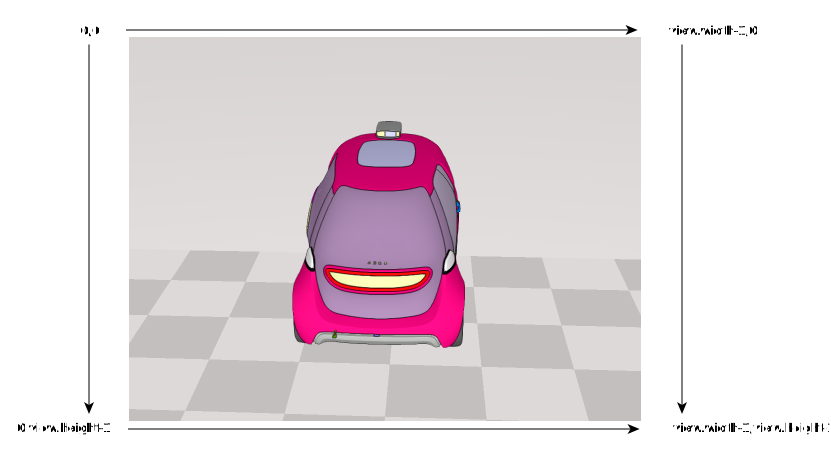
The PrimitiveManagerRubberBandInterface can be used to display a rectangular area on top of the 3d rendering element.
or with async calls :
Please make sure the destination browser supports promises before using async calls.
Screenshots.
Screenshots can be performed with the screenshot call. The screenshot procedure is asynchronous, and the InfiniteEngineInterfaceSignal.ScreenshotReady event is fired when the screenshot is ready. The screenshot call returns an id, and this is must match the attachment of the InfiniteEngineInterfaceSignal.ScreenshotReady event which is an InfiniteImageInterface (InfiniteImageInterface.screenshotid). An empty string means the screenshot procedure has failed (a missing setView call probably). An empty InfiniteImageInterface.width or InfiniteImageInterface.height means the image is invalid. Multiple screenshot calls can be executed concurrently.
You may want to call setFixedResolution to get a screenshot of this size.
or with async calls :
Please make sure the destination browser supports promises before using async calls.
Camera manipulation.
The camera is manipulated from the CameraManagerInterface, accessed through getCameraManager. Some default behaviors are available in order to avoid the developer to code a lot of event handling in order to make the camera move in an interesting way. Multiple behaviors are available, e.g. orbital ones, when the camera moves around a center of interest.
You may create animations to move, rotate the camera.
Cut Plane manipulation.
A cut plane is a theoretical 3D plane that "cut" objects. A cut plane (3D Affine hyperplane) is defined by a position
Pthat belong to the plane and a normalN : (Nx,Ny,Nz). Such a plane has the equation : {x,y,z} / Nx.x + Ny.y + Nz.z = dot(N,P). Each vertex on the side of the normalNwill be discarded, so every vertex V : {Vx,Vy,Vz} / Nx.Vx + Ny.Vy + Nz.Vz > dot(N,P) will be discarded.Cut planes are modified through the CutPlaneManagerInterface accessible through getCutPlaneManager.
A CutPlaneManipulatorInterface may be created and bound to a cut plane to display a GUI element that allows the end user to change the cut plane orientation / position through CutPlaneManagerInterface.createCutPlaneManipulator.
Object with a visual state VisualStates.S_IgnoreCutPlane will not be affected by cut planes.
Setting cut planes.
Transformations.
You may change the matrix of a set of parts. If you want to compose some matrix on top of the existing one, just use InfiniteEngineInterface.addMatrix. You may also override the full matrix of a given piece with InfiniteEngineInterface.setMatrix.
Setting transforms.
You may also 'explode' geometries in one or multiple directions, objects are translated depending on the distance between the center of the explosion and the center of each object.
Setting 'explosions'.
Annotations.
The rendering may be enriched to display 2D data representing measures, drawings (Functional Tolerancing and Annotations, Product Manufacturing Information, Measures, etc). These data are basically a 3D plane containing information in form of texts, curves, and symbols in this plane. Data of this type is referred to an Annotation. Annotations rendering are available through InfiniteEngineInterface.getAnnotationRenderer.
3D Primitives.
3D Points, 3D lines, 3D boxes and a single 2D rectangle can be rendered on top of the DMU, with a rendering hint depending on the relative depth between the 3D primitives and the geometries. 3D primitives are accessed through the getPrimitiveManager function (PrimitiveManagerInterface). The colors of the 3D primitive are handled by the PrimitiveManagerMaterialInterface, accessed through PrimitiveManagerInterface.getPrimitiveMaterialManager. Materials are accessed by their ids, and modified by their ids. 3D primitives are rendered colored with their material id, and not directly from a color.
3D Points.
The rendering can be enriched with 3D points rendered on top of the geometries, with a rendering hint telling if the point is over or under a geometry.
Point Creation sample :
Creating a point.
3D Lines.
The rendering can be enriched with 3D lines rendered on top of the geometries.
Line Creation sample :
Creating a line.
3D Boxes.
The rendering can be enriched with 3D boxes rendered on top of the geometries, with a rendering hint telling if the edge/face is over or under a geometry.
Box Creation sample :
Creating a Box.
2D rectangle (rubber band).
The rendering can be enriched with a single 2D rectangle rendered on top of the geometries. The color cannot be changed.
Rectangle usage sample :
Using a Rectangle.
WebXR (experimental).
You may use the InfiniteEngineInterface api with WebXR sessions :
Please note that dedicated hardware is required to use WebXR. See https://developer.mozilla.org/en-US/docs/Web/API/WebXR_Device_API/Fundamentals.
See